Once again, it was Global Game Jam this weekend!
I was again jamming at MIT, though now that the MIT Game Lab has dropped the GAMBIT part and moved onto the main campus, the logistics were a bit different this year. The presentations were held in one of the auditorium-classrooms, and everyone jammed in some of the classrooms in building 26. They were pretty lax about the food, which was nice, compared to the Boston FIG Jam which was held in the same rooms. The funny thing is, I've only been to MIT a handful of times, but every time has been in these same classrooms - despite the large campus, I'd think these were the only classrooms available in the entire school.
The theme this year was another simple one - a heartbeat.
I had brainstormed a bit with one of the sound guys there, and ended up with a game pitch where sound factored heavily into gameplay, because of course. However, he decided to go with another project, and I ended almost by myself, though awesome sound designer Dan Perry opted to join the project. I had worked with him a couple years ago on the Punk is Dead project.
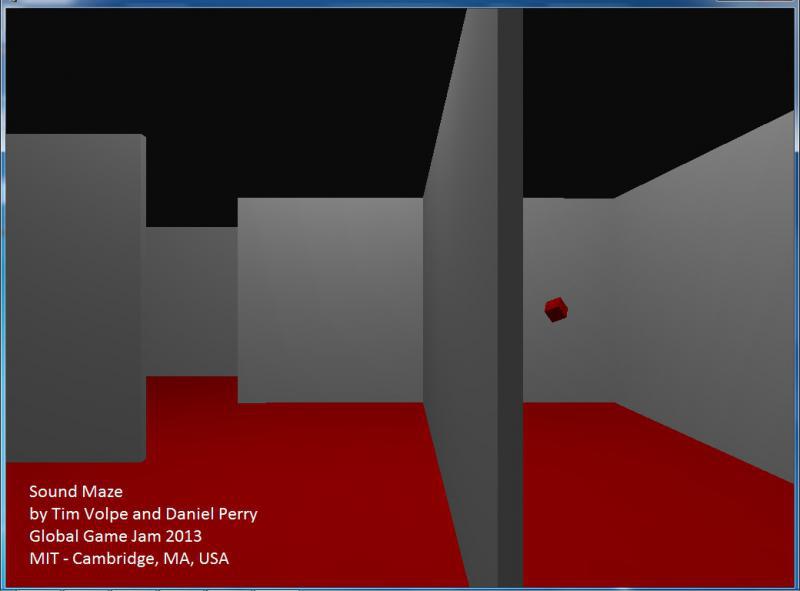
Sound Maze
Yes, a rather uncreative working title. The game is a first-person maze/labyrinth navigation game. It takes place in two parts - the first half where you maneuver around normally, as you might expect with any videogame. When you grab the icon in the center, the game shifts to the second phase, where you have to find your way back out in near-total darkness, using your sense of hearing to guide you.
There are two mazes here, so finding your way back out is not as simple as retracing your steps. The original pitch included the idea that the "visual" maze remained visible while you had to navigate the "audio" maze - open passageways might be blocked, and you could walk though some walls on the screen. Luckily, the overall game design was simple enough that the prototype was finished fairly early on Saturday, and we were able to playtest it. We had found that our progress in teaching the player to navigate by sight was negated by literally changing the rules midway through, and it was very frustrating and confusing trying to push in certain directions fruitlessly. So, we changed it to darkness, where your sense of sight was instantly disabled. The goal object in this half emanates a heartbeat, which gets louder as you approach - this came from a thought I had about not approaching a sound, but rather you hearing your own heart beating in your chest as you approach the end.
A lot of the tweaks from there on involved adding hand-holding for players. None of the feedback systems (player movement, sounds when approaching walls, sounds when hitting walls) are terribly robust, so a player can get lost or frustrated quickly. So, the "sky" was set to a very dark gray rather than black, so there is a little bit of light available. We also added lantern flashes, crudely added as the walls lighting up, to give the player a brief glimpse of where they are. We also found, with the mazes I had slapped together, that reaching the goal in the dark half required the unintuitive task of moving away from the heartbeat (where the goal was) before rounding a corner and heading back. This was fixed by altering the hidden maze a bit to avoid backtracking.
What Went Right: Thankfully the design was simple enough that I felt the game was adequately complete early on, allowing for time for tweaking rather than trying to get it to run at all. Since I decided upon a 3D first-person perspective, I felt Unity was a good engine to develop in. While I don't have a lot of experience developing in Unity, I know the basics, and I felt this was a great opportunity ti dive in and have a "trial by fire". And because I was the only developer, source control wasn't a great concern as everything was saved on my machine.
What Could Go Better: That being said, ideally I would've liked at least one other person, familiar with Unity, to have been on the team. A lot of really basic things probably could have been solved early on (and special thanks to Michael Carriere and Alex Schwartz for helping me with such issues) that could have left time for more feature development. An artist of some type would have helped too, whether it was by making the game not look so ugly, or perhaps helped with the lighting to aid gameplay and provided a better sense of atmosphere. One of my stretch goals was to include randomly generated mazes, which might've happened if someone else was there to share the burden of development.
I'm really pleased how the game turned out, though, despite the prolific "programmer art". Further tweaks that could be made are cleaning up the movement and audio feedback, sound optimization, and the aforementioned random mazes.
Another nice thing about programming the game in Unity - not only does it run on PC and Mac, but you can export a web build! So you can play the game right here - like I said, the sound needs optimization, so it'll take a while to load...please be patient.
Showing posts with label game development. Show all posts
Monday, January 28, 2013
Monday, January 10, 2011
HTML5 Tools Jam
On the weekend of January 8th and 9th, Darren Torpey and Darius Kazemi hosted the first Boston Game Jam of 2011. Which is a bit of a misnomer, since this was a tools jam. The idea was to spend some time working and collaborating on a bunch of tools using HTML5, with the idea being not only to learn about this relatively new technology, but to make some ready-to-use tools in the upcoming Global Game Jam.
This was an intimate affair, with only about 10 people participating, and once again held at the Singapore-MIT GAMBIT Game Lab in Cambridge. The projects were interesting - it's really cool to see this technology work "in browser" instead of going through the rigmarole of compiling and various file types and stuff. I can't claim to be an expert in HTML5 or even Javascript, but I'm learning, and the potential here is really exciting.
My own project was inspired by the Akihabara engine, specifically the "toys" that are built into it, which provide the framework to create various arcade games. My goal was to build a similar toy to create card games - partly because card games are easy and cool, and partly to share since people will have the opportunity to create card and board games at the Global Game Jam this year. Darren and Darius quickly talked me out of that, since there's a lot of overhead into learning and using the Akihabara engine. So the project evolved into creating a Javascript library, with the cards being displayed in browser using CSS3.
By the end of the day on Saturday, I had most of the framework written, designed and tested out, and Darren had a crude card system working early on Sunday. The goal was set to put together a solitaire game to make sure the system would handle most everything that someone might expect it to, and by the time presentations were due, most of it was in place.
There are a few things left that I'd like to get done before I call it finished. One, finish up the functionality. Two, clean up the code and make sure things can be written easily (more for my own benefit, especially on the CSS side). Three, make sure it's all documented. Then, at least, we should be able to write card games with a standard poker deck.
My ultimate goal is to make the library more extensible and abstract, so that someone could write any kind of card game. This goal kind of got in my own way...I had grand plans for this project, when in reality it isn't all that complicated. But at the very least, I'll have the libraries to work on my own games. I'll be sure to post again when I've got something ready to show.
Special thanks to Darren who worked with me on the project on the second day, to Darius for his occasional help with Javascript and Git, and to Jonathon Myers for letting me use his spare laptop. :)
This was an intimate affair, with only about 10 people participating, and once again held at the Singapore-MIT GAMBIT Game Lab in Cambridge. The projects were interesting - it's really cool to see this technology work "in browser" instead of going through the rigmarole of compiling and various file types and stuff. I can't claim to be an expert in HTML5 or even Javascript, but I'm learning, and the potential here is really exciting.
My own project was inspired by the Akihabara engine, specifically the "toys" that are built into it, which provide the framework to create various arcade games. My goal was to build a similar toy to create card games - partly because card games are easy and cool, and partly to share since people will have the opportunity to create card and board games at the Global Game Jam this year. Darren and Darius quickly talked me out of that, since there's a lot of overhead into learning and using the Akihabara engine. So the project evolved into creating a Javascript library, with the cards being displayed in browser using CSS3.
By the end of the day on Saturday, I had most of the framework written, designed and tested out, and Darren had a crude card system working early on Sunday. The goal was set to put together a solitaire game to make sure the system would handle most everything that someone might expect it to, and by the time presentations were due, most of it was in place.
There are a few things left that I'd like to get done before I call it finished. One, finish up the functionality. Two, clean up the code and make sure things can be written easily (more for my own benefit, especially on the CSS side). Three, make sure it's all documented. Then, at least, we should be able to write card games with a standard poker deck.
My ultimate goal is to make the library more extensible and abstract, so that someone could write any kind of card game. This goal kind of got in my own way...I had grand plans for this project, when in reality it isn't all that complicated. But at the very least, I'll have the libraries to work on my own games. I'll be sure to post again when I've got something ready to show.
Special thanks to Darren who worked with me on the project on the second day, to Darius for his occasional help with Javascript and Git, and to Jonathon Myers for letting me use his spare laptop. :)
Monday, July 27, 2009
Game Development - Escape Game #2
The "Escape the Room" game (working title)
Progress: Prototype phase
All right, I think I've gotten over the initial hurdles of game navigation. I decided to redesign the inventory to stay on-screen at all times. The retractable inventory was getting a little unwieldy, plus I like the idea of seeing what objects you have available at a glance. The only problem is that the inventory "slides" along with the rest of the room when the player changes views, but it's more of an aesthetic issue that hopefully no one will notice. Well, unless they've read this. To help combat that issue, I've placed the inventory at the bottom of the screen.
So here's how it works: the player clicks and drags items from the inventory onto the screen, and the item snaps back into place when the player releases the mouse button. Unless it happened to be over the hot spot (the red square, in this case), in which case it will set the item there and disable it from the inventory. And by disabled, I mean the item stays there, but is grayed out and can't be clicked or moved. As an early design decision, I figured, like some escape games, that I'd have a fixed inventory - usually when the inventory is full but all the items are used, you're at the end of the game. It's an easy fix to just wipe the item out of the inventory if I need more storage space, so to speak.
By the way, the "S" on the wall there indicated that it's the south wall. I've got an "E" and "W" wall as well, and the door (as seen in the previous post) is on the north wall. Hooray for programmer art!

I've also implemented the close-up feature seen in many escape games. Typically you can zoom in on an object for closer inspection...this is most often for combining two objects for another purpose, or there's some clue to another puzzle hidden on the back or inside the object. Here, the player toggles the button on the lower right to engage "zoom" mode, then clicks an item in the inventory. A gray screen pops up with an enlarged picture of the item. The player cannot resume play until the close-up screen is closed with the button in the upper right.
One helpful side-effect of writing this all out in a blog is that I'm realizing potential pitfalls when it comes to my game design. For example, I just remembered that I effectively disabled clicking-and-dragging inventory items when the item is in close-up, to prevent said item interacting with what's going on behind the close-up "window". This will no doubt hinder any future puzzles if I plan to combine items. So, I wrote myself a note, and will see to fixing that later.
With the higher level components of the game mostly taken care of, now comes the hard part - puzzle design!
Progress: Prototype phase
All right, I think I've gotten over the initial hurdles of game navigation. I decided to redesign the inventory to stay on-screen at all times. The retractable inventory was getting a little unwieldy, plus I like the idea of seeing what objects you have available at a glance. The only problem is that the inventory "slides" along with the rest of the room when the player changes views, but it's more of an aesthetic issue that hopefully no one will notice. Well, unless they've read this. To help combat that issue, I've placed the inventory at the bottom of the screen.
So here's how it works: the player clicks and drags items from the inventory onto the screen, and the item snaps back into place when the player releases the mouse button. Unless it happened to be over the hot spot (the red square, in this case), in which case it will set the item there and disable it from the inventory. And by disabled, I mean the item stays there, but is grayed out and can't be clicked or moved. As an early design decision, I figured, like some escape games, that I'd have a fixed inventory - usually when the inventory is full but all the items are used, you're at the end of the game. It's an easy fix to just wipe the item out of the inventory if I need more storage space, so to speak.By the way, the "S" on the wall there indicated that it's the south wall. I've got an "E" and "W" wall as well, and the door (as seen in the previous post) is on the north wall. Hooray for programmer art!

I've also implemented the close-up feature seen in many escape games. Typically you can zoom in on an object for closer inspection...this is most often for combining two objects for another purpose, or there's some clue to another puzzle hidden on the back or inside the object. Here, the player toggles the button on the lower right to engage "zoom" mode, then clicks an item in the inventory. A gray screen pops up with an enlarged picture of the item. The player cannot resume play until the close-up screen is closed with the button in the upper right.
One helpful side-effect of writing this all out in a blog is that I'm realizing potential pitfalls when it comes to my game design. For example, I just remembered that I effectively disabled clicking-and-dragging inventory items when the item is in close-up, to prevent said item interacting with what's going on behind the close-up "window". This will no doubt hinder any future puzzles if I plan to combine items. So, I wrote myself a note, and will see to fixing that later.
With the higher level components of the game mostly taken care of, now comes the hard part - puzzle design!
Tuesday, July 21, 2009
Game Development - Escape Game #1
All right. Here it is. If I'm going to be talking this project up to people, I'd better follow through on my promise to myself and get some actual work done on this.
The "Escape the Room" Game (working title)
Progress: Early prototype phase
As I mentioned elsewhere on my website, some of my favorite games to play online are the "escape the room" games, which I usually find at Jay is Games. It was suggested to me that since I like them so much, I should make one. So, here is the beginning stages of that project.
For those unfamiliar with the genre, "escape the room" games are pretty much just that - you find yourself locked in some kind of enclosure, and you have to use the objects found inside the room to escape. This takes the form of logic puzzles, ranging from the simple (use key on locked desk drawer) to figuring out codes (combination locks) to sometimes bizarre leaps in logic (tie a sawblade to an eggbeater to fashion a drill). It seems that these games are popular in Japan; therefore, you'll occasionally have to sift through some Engrish. And sometimes it devolves into a tedious pixel hunt. Luckily, on the Jay is Games site, a walkthrough is usually posted within a few hours if you get stuck.
If you'd like to try these kinds of games out, one of my favorites is Vision. This one is a bit long, but anything else by the developer, neutral, is also very good.
I've decided to start out by developing this in Game Maker. Why? Because it's free, I know how to use it, and it's what I have. I would do it in Flash, if I could afford it to tinker around with it. These kinds of games are a little complicated for something in 3D, although maybe if I had the resources and art software, I could do that. But for now, Game Maker.
Right now, all I have is the room itself, and a crude navigation system. The nice thing about Game Maker is that it's set up as a series of rooms. My plan is that each view, or side of the room, or close up, can be represented with a separate room in Game Maker, and the inventory and such can be dealt with by "persistent" objects.
My main sticking point right up front is exactly how I'd like the game to operate. Oftentimes these games have an inventory on the side of the "room" picture. Since I'm experimenting here, I have currently implemented a retractable inventory (as indicated by the blue "I"). I'm deciding how I want the player to interact with the inventory, whether to select and highlight it in the inventory, or allow the user to drag the object around with the mouse. I need to sit down and either design out how I want this to work, or just fiddle with it some more until I get something I like.
So that's what I got so far. I'm going to attempt to get a fairly intuitive interface finished (at least by escape-the-room standards), and then I'm going to write up a story/design some puzzles.
The "Escape the Room" Game (working title)
Progress: Early prototype phase
As I mentioned elsewhere on my website, some of my favorite games to play online are the "escape the room" games, which I usually find at Jay is Games. It was suggested to me that since I like them so much, I should make one. So, here is the beginning stages of that project.
For those unfamiliar with the genre, "escape the room" games are pretty much just that - you find yourself locked in some kind of enclosure, and you have to use the objects found inside the room to escape. This takes the form of logic puzzles, ranging from the simple (use key on locked desk drawer) to figuring out codes (combination locks) to sometimes bizarre leaps in logic (tie a sawblade to an eggbeater to fashion a drill). It seems that these games are popular in Japan; therefore, you'll occasionally have to sift through some Engrish. And sometimes it devolves into a tedious pixel hunt. Luckily, on the Jay is Games site, a walkthrough is usually posted within a few hours if you get stuck.
If you'd like to try these kinds of games out, one of my favorites is Vision. This one is a bit long, but anything else by the developer, neutral, is also very good.
I've decided to start out by developing this in Game Maker. Why? Because it's free, I know how to use it, and it's what I have. I would do it in Flash, if I could afford it to tinker around with it. These kinds of games are a little complicated for something in 3D, although maybe if I had the resources and art software, I could do that. But for now, Game Maker.
Right now, all I have is the room itself, and a crude navigation system. The nice thing about Game Maker is that it's set up as a series of rooms. My plan is that each view, or side of the room, or close up, can be represented with a separate room in Game Maker, and the inventory and such can be dealt with by "persistent" objects. My main sticking point right up front is exactly how I'd like the game to operate. Oftentimes these games have an inventory on the side of the "room" picture. Since I'm experimenting here, I have currently implemented a retractable inventory (as indicated by the blue "I"). I'm deciding how I want the player to interact with the inventory, whether to select and highlight it in the inventory, or allow the user to drag the object around with the mouse. I need to sit down and either design out how I want this to work, or just fiddle with it some more until I get something I like.
So that's what I got so far. I'm going to attempt to get a fairly intuitive interface finished (at least by escape-the-room standards), and then I'm going to write up a story/design some puzzles.
Thursday, July 9, 2009
Renewal of Resolve
I've fallen into a rut, and it's not the good kind of rut. Or else it'd be a routine. Anyway, I've fallen back into bad habits, and I haven't made much progress lately toward my goal of getting a job in the videogame industry. Part of that progress involves staying on top of videogame trends as well as my own personal development. Both of these things I plan to keep updates on my website and this blog, which I have been neglecting lately.
So, here's the plan.
Step 1: Work on my own games.
Since I'm not employed as of this writing, technically I could consider myself an independent game developer. And as such, I should be making games. I've had a couple ideas floating around in my head, and now is the time to put them into practice. And for accountability purposes, I'm going to blog about the process.
Step 2: Play more MMOs.
I attended the Boston Postmortem again last night, and talked with some people from Turbine, one of the major game companies in the Boston area. It seems like if you hold a game job at a company in Massachusetts, chances are that you worked for Turbine at some point. And I realized that I'm not as well versed in MMOs as I probably should be, considering a) if I want to work at Turbine, and b) given the plethora of free-to-play MMOs that are out there. Granted, most may not be of the best quality, but then, one could argue that for a majority of games. Anyway, my point is that I'm going to try some more of these MMOs, and write some of my experiences about them.
Step 2a: Write about casual games.
Another thing I had planned, related to the previous paragraph, was to write about some of my more favorite casual games that I had found online. I probably won't go into a detailed review, but I wanted to show off some of the games I thought were fun, and maybe provide a little insight into the kinds of games that I enjoy.
Hopefully this gives my blog here a little more focused purpose, and maybe you and I can both learn something from all of this. There's a strong chance I'll even make Twitter updates when I update here, for added pressure on myself. Wish me luck!
So, here's the plan.
Step 1: Work on my own games.
Since I'm not employed as of this writing, technically I could consider myself an independent game developer. And as such, I should be making games. I've had a couple ideas floating around in my head, and now is the time to put them into practice. And for accountability purposes, I'm going to blog about the process.
Step 2: Play more MMOs.
I attended the Boston Postmortem again last night, and talked with some people from Turbine, one of the major game companies in the Boston area. It seems like if you hold a game job at a company in Massachusetts, chances are that you worked for Turbine at some point. And I realized that I'm not as well versed in MMOs as I probably should be, considering a) if I want to work at Turbine, and b) given the plethora of free-to-play MMOs that are out there. Granted, most may not be of the best quality, but then, one could argue that for a majority of games. Anyway, my point is that I'm going to try some more of these MMOs, and write some of my experiences about them.
Step 2a: Write about casual games.
Another thing I had planned, related to the previous paragraph, was to write about some of my more favorite casual games that I had found online. I probably won't go into a detailed review, but I wanted to show off some of the games I thought were fun, and maybe provide a little insight into the kinds of games that I enjoy.
Hopefully this gives my blog here a little more focused purpose, and maybe you and I can both learn something from all of this. There's a strong chance I'll even make Twitter updates when I update here, for added pressure on myself. Wish me luck!
Subscribe to:
Posts (Atom)